As above - I can add in the markers to do it, but would love this to be a feature that can be applied to the last track to make it easier/consistent amongst mixes.
Either click on the audio waveform and Press Ctrl-V (or Right Click on the timeline and select “Add Volume effect”)
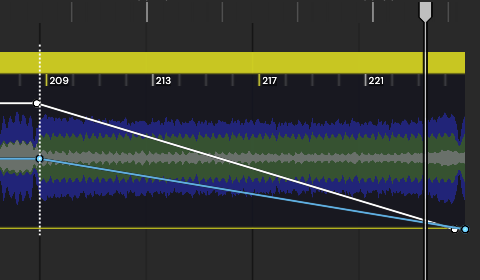
Double-Click on the Automation line where you want to start fading out to add an automation control marker
Drag the marker at the end of the Automation line down to -50db?
To make this any easier the software would have to provide you an option in a right-click menubox after you select the block of audio in the timeline to signify the start and endpoints to apply the volume automation points.
Robert Keel
•
Nov 22, 2024
This would be great! A choice of various types of fades would be ideal: logarithmic fade, linear fade, echo fade. These would be useful for both fade outs AND fade ins.
Log in to comment and vote
Comments2
Gavin Staveley
Jun 10, 2025
Isn’t this a simple 3 step process?
Either click on the audio waveform and Press Ctrl-V (or Right Click on the timeline and select “Add Volume effect”)
Double-Click on the Automation line where you want to start fading out to add an automation control marker
Drag the marker at the end of the Automation line down to -50db?
To make this any easier the software would have to provide you an option in a right-click menubox after you select the block of audio in the timeline to signify the start and endpoints to apply the volume automation points.
Robert Keel
Nov 22, 2024
This would be great! A choice of various types of fades would be ideal: logarithmic fade, linear fade, echo fade. These would be useful for both fade outs AND fade ins.